

Imagine this scenario – a user utilized their personal account to test a service on their computer. Unfortunately, the recovery option for the service was set to restart indefinitely. After testing, the user forgot about it until the day came for a password change. Suddenly, the user found themselves locked out of their account. The help desk unlocked the account, but it was soon locked out again!
A similar situation can occur with scheduled tasks running on a personal account or with cached passwords for mapped drives, among other things.
How do we troubleshoot such an issue? First and foremost, we need to download the Microsoft Account Lockout and Management Tools from the following website:
https://www.microsoft.com/en-us/download/details.aspx?id=18465
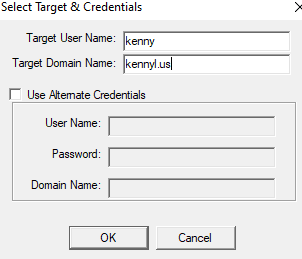
After installation, open the tool and click on File -> select target to enter the user account name. For example, if the domain is Kennyl.us and the user account is Kenny, enter that information in the field.

In the locked out report, we can observe the “last bad pwd” time. Look for the most recent time and check the “Orig Lock” to determine the source.
Next, access the Event Viewer of the domain controller that locked the account and search for event ID 4740 in the Security Log.
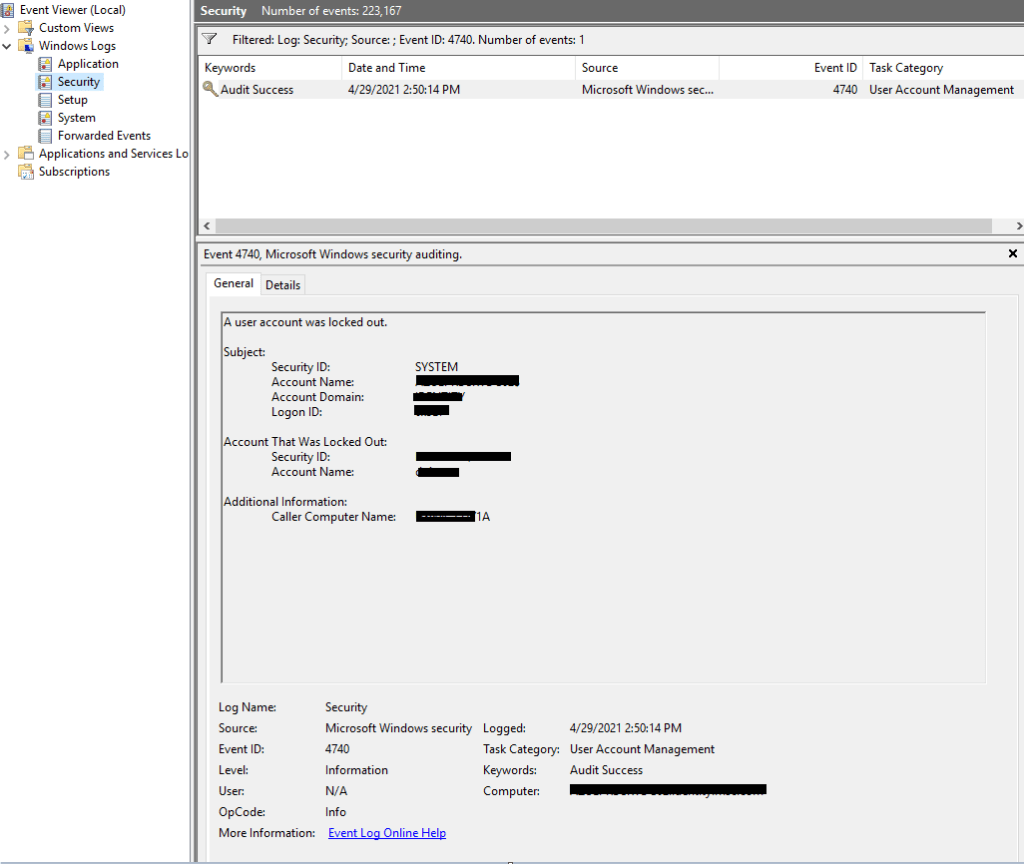
If there are multiple event ID 4740 entries for different users, locate the one that contains the Security ID and Account Name matching the user’s details. Pay attention to the Caller Computer Name field, which represents the computer where the user attempted to log in and caused the account lockout.
Once you have this information, access the Event Viewer of the corresponding computer. Filter out Event ID 4625 in the Security Log and investigate what is triggering the account lockout. Microsoft provides a list (available at https://docs.microsoft.com/en-us/windows/security/threat-protection/auditing/event-4625) that describes the logon types to identify what is utilizing the user account.


In this case, I found that the bad password logon type 5 was associated with a service. I accessed ‘services.msc’ on the user’s computer and checked for any services running under their account. I requested that the user either update the password for this service or disable it if it was no longer in use. Once the service was disabled, the user’s account was no longer locked out.
 KennyL System Admin